
Mobile applications these days offer much more than basic functions. They have started answering customers’ queries, recommending products, creating content, performing image recognition, and automating daily chores. This is very helpful for companies in improving the user experience.
Since many companies are opting for intelligent mobile apps, the flutter app development services have become popular to develop efficient apps on various platforms. Flutter is the UI toolkit provided by Google that makes app development for Android, iOS, web, desktop, and other platforms simple using a single source code.
Combining the use of AI models like Gemini, OpenAI, and Claude, Flutter helps in incorporating intelligent features without the need for creating separate applications.
Why Flutter Is an Excellent Framework for AI-Powered Apps
Flutter has become an effective choice for AI-driven app development because of its ability to enable faster development of high-end apps.
Instead of having two separate projects for Android and iOS app development, developers can create apps using a single project, saving time and effort.
This is why custom Flutter development services are a good option for all sorts of businesses.
Some of Flutter’s biggest advantages include the following.
- Development for multiple platforms such as Android, iOS, web, and desktop.
- Fast enough performance for good user experience.
- Built-in UI components for designing contemporary applications.
- Hot Reload for more effective development.
- API integration with AI models including Gemini, OpenAI, and Claude.
- High level of community support with lots of packages.
- Good scalability for both startups and enterprises.
This is why Flutter is an excellent choice when creating AI chatbots, virtual assistants, recommendation engines, health care, finance, and education applications. Using Flutter allows developers to create applications that use AI technologies faster.
Understanding the Leading AI Models for Flutter Integration
Selecting the proper AI model depends on the kind of application that you want to develop. While the Gemini, OpenAI, and Claude AI models can be used with Flutter apps via APIs, they have various strengths. It is useful to know what each of them is capable of before deciding on which one to use.
Google Gemini
Gemini, created by Google, is built to handle multiple data forms such as text, images, audio, and video. It is also capable of handling long context windows, which makes it suitable for handling many data forms at once.
The Gemini framework is well integrated into Google Cloud and other Google products, thus making it a useful framework for Android applications. The application framework is widely applied in creating smart assistants, image-based search, and productivity applications.
OpenAI
There are GPT models available at OpenAI that are widely used for conversational purposes. They can respond to queries, create content, code, function, and even analyze images.
OpenAI is used widely for chatbots, writing assistance, customer support, and productivity tools because of its overall popularity among developers and its good documentation for APIs. The flexibility of its API makes it a good choice for integrating AI into mobile applications.
Claude
Claude is created by Anthropic and is noted for its excellent abilities to reason and analyze documents. It works effectively when handling long documents such as reports, contracts, and academic papers.
Claude is thus a good choice when there are enterprise-level security features that ensure that you get an accurate answer even when handling large amounts of text. The model is preferred when working on tasks that involve processing lots of documents.
Gemini vs OpenAI vs Claude: Feature Comparison
| Feature | Google Gemini | OpenAI | Claude |
| Best Use Cases | Android apps, Google Workspace integration, multimodal applications, smart assistants | Chatbots, content creation, coding assistants, customer support, productivity apps | Document analysis, business automation, legal, finance, research, enterprise workflows |
| Strengths | Strong integration with Google’s ecosystem, supports multiple content formats, long-context understanding | Natural conversations, code generation, function calling, broad developer ecosystem | Advanced reasoning, detailed document processing, enterprise-focused safety features |
| Multimodal Support | Supports text, images, audio, and video | Supports text and image understanding in supported models | Primarily focused on text, with expanding multimodal capabilities in newer models |
| Coding Assistance | Good for code generation and debugging | Excellent for coding, explanations, and developer support | Helpful for code reviews, reasoning, and technical documentation |
| Context Window | Large context window for handling long conversations and documents | Varies by model, with support for extended context in newer versions | Large context window, making it suitable for long reports and detailed analysis |
| Enterprise Readiness | Well suited for businesses using Google Cloud and Google services | Flexible APIs and enterprise offerings for different business needs | Built with enterprise security and document-heavy workflows in mind |
Step-by-Step Flutter AI Integration Process
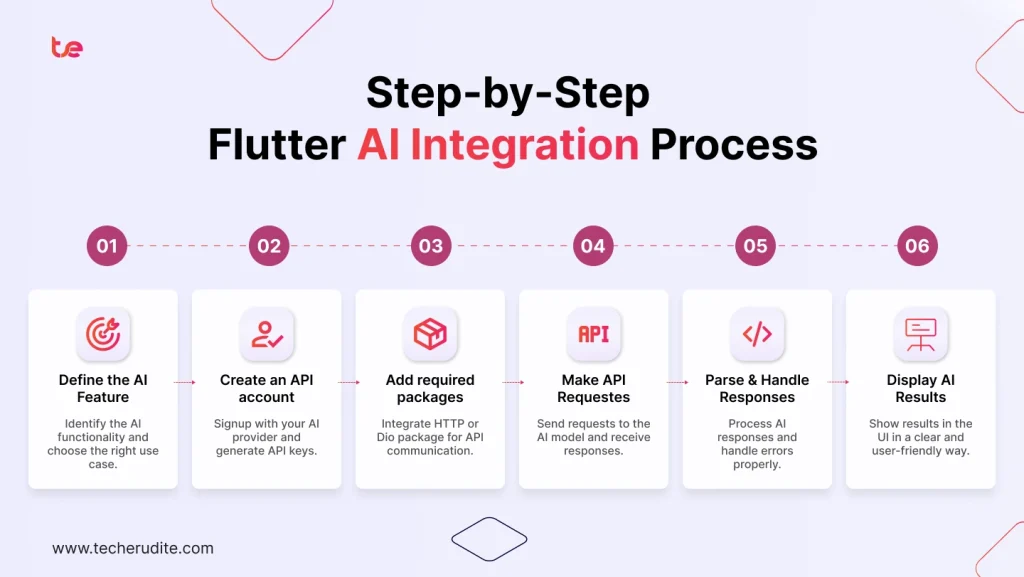
Adding AI in a Flutter application becomes much simpler if you use a proper development process. Be it a chatbot, virtual assistant, or recommendation system, this approach can enable you to develop a reliable application.
Step 1: Define the AI feature
Decide what task you want the AI to perform first. You can use the AI to give answers to customers, create content, translate, or provide recommendations. Then, select an AI provider that suits your project requirements.
Step 2: Create an API account
Sign up with your chosen AI service and create the necessary API keys. Keep these keys safely rather than putting them straight into your application.
Step 3: Connect the AI service
Ensure that you integrate the provider’s REST API or SDK to allow for communication between the app and the AI model.
Step 4: Design the user interface
Create an easy-to-use interface in the form of a chat screen, voice assistant, or search box that allows users to easily communicate with the AI.
Step 5: Send and process requests
Securely send prompts from users to the AI model and then process those responses to be shown in the application.
Step 6: Handle responses properly
Show loading indicators when waiting for data and error messages when a request is not successful or there is no internet connection.
Step 7: Improve performance
Utilize response streaming, cache often accessed outputs, create concise prompts, and safeguard your API keys using secure storage or a backend system.
Although all these steps provide a clear road map, there is still the need for detailed planning and testing. There are many businesses that work with a flutter mobile application development company to ensure secure integration, better scalability, and long-term performance.
Modular Architecture separates the components of AI from the rest of the application. This kind of architecture will allow for easier upgrading, replacement of the models and adding AI capabilities in the future.
Real-World AI Applications Built with Flutter
Flutter is used for the flutter AI app development in various industries. The advantage of using Flutter for such purposes is its ability to be integrated into multiple platforms and use API without difficulty.
- AI chatbots: Respond to customers’ questions right away, give them product-related information, and decrease the burden on customer service representatives.
- Virtual assistants: Assist users in managing their schedules, setting reminders, responding to voice commands, and accomplishing various day-to-day activities.
- Automated customer support: Take care of routine questions, order tracking, and complex questions by forwarding them to human representatives.
- AI Healthcare Applications: Help with symptom checking, booking appointments, drug administration, and supporting patients while making healthcare services more accessible.
- AI Finance & Expense Tracking Apps: Classify expenses, monitor spending behavior, identify anomalies, and provide customized budgeting advice.
- AI Education & Learning Platforms: Generate customized learning programs, answer queries from students, design quiz games, and offer immediate feedback.
- AI Travel Planning Apps: Suggest destinations, create travel plans, calculate budgets, and give real-time help on travels.
- AI Content Writing Tools: Create blog post ideas, draft emails, create summaries of any document and assist in creating content faster.
- AI Translation Apps: Translate text or conversation into different languages to make communication easier for global users.
- AI Coding Assistants: Assist developers in writing codes, explaining programming concepts, detecting errors and making suggestions.
Best Practices for Flutter AI Development
Using the right software development practices will allow you to develop secure and efficient artificial intelligence applications using the Flutter framework. It will also make your application maintainable and create a great user experience.
- Protect API keys: Keep your API keys safe, and use backend proxies rather than showing them in your mobile app.
- Write better prompts: Better prompts mean fewer tokens are needed, resulting in cost savings for the API.
- Cache common responses: Cache commonly generated responses to avoid making unnecessary requests from the API.
- Design a responsive UI: Display loading indicators, progress messages, and appropriate error messages so that the user can see what is going on.
- Validate user input: Before passing any user input to the AI model, validate and sanitize the data.
- Use authentication and authorization: Secure user accounts and limit access to certain sensitive parts.
- Respect user privacy: Observe privacy laws and collect only the necessary amount of data for your application.
- Monitor performance and costs: Track API usage, response times, and spending to avoid unexpected expenses.
- Plan for future updates: Create an architecture that is scalable and enables you to switch models and even add AI capabilities without much effort.
Common Challenges in Flutter AI Integration
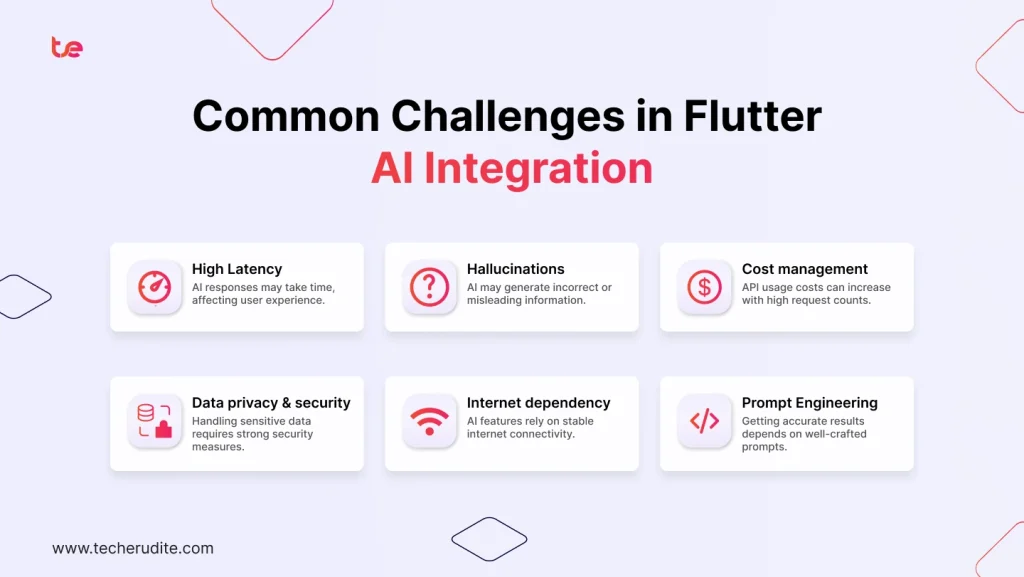
When integrating AI with Flutter applications, some difficulties arise for developers. Below are some solutions to these problems.
- API rate limits: Implement request queuing and retry logic to ensure that no requests fail when there is heavy traffic.
- Response latency: Introduce loading indicators or response streaming to keep the user occupied during waits.
- Cost management: Keep prompts brief and avoid making excessive API requests.
- Incorrect or hallucinated response: Verify the critical information generated by AI before presenting it to users.
- Internet dependency: Have mechanisms to handle failures in internet connection gracefully.
- Privacy issues: Securely store the data and follow all relevant data protection policies.
- Complexity in model selection: Find the capabilities of models according to your applications’ needs before implementation.
- Context Management: Provide summaries of past discussions for retaining context but minimizing token use.
Early planning for these challenges enables one to develop secure, reliable, and cost-effective Flutter AI apps.
Why Businesses Choose Professional Flutter AI Development Services
Most businesses prefer flutter application development services by professionals because they have the capacity to develop an AI-enabled application more efficiently and quickly. They can create scalable structures that include security measures within the application.
Professional teams also pay attention to creating intuitive user interfaces for better user experience. They track application performance, optimize API use to reduce expenses, and perform routine maintenance. As AI models develop further, updates can help companies stay relevant without requiring major redevelopment.
Another great advantage includes availability of Flutter & AI experts that will be able to suggest the best fitting model for the business, regardless whether it is Gemini, OpenAI, or Claude, depending on the project needs, budget, and technical specifications.
Wrapping It Up
Flutter provides an efficient framework to build AI-based apps that run on platforms such as Android, iOS, web, and desktop using just one codebase. For example, Gemini, OpenAI, and Claude have unique features that make them more appropriate for various business purposes. Therefore, the selection of a particular model will depend on several factors.
Following the principles of good development will ensure that the application created is not only safe and scalable but also offers a better experience for users. Businesses looking to integrate AI into their Flutter applications can benefit from partnering with an experienced Flutter app development company like TechErudite, which helps identify the right AI model and implement secure, scalable solutions tailored to specific business requirements.
